Every scheduling tool promises to save you time. Most of them probably will – but the features that matter depend on how your business works, how many staff you manage, and what problems you are actually trying to solve.
According to a Zoho Bookings survey of more than 1,700 working professionals, 44% of businesses say back-and-forth scheduling is their biggest time sink, and 36% regularly deal with double bookings. If either of those sounds familiar, the right software can fix it. But “right” does not mean “most features.” It means the features you need, working the way you expect.
This guide gives you a practical checklist – not a product comparison. Use it to evaluate any tool you are considering, whether that is Minuvox, a competitor, or something you have not heard of yet.
Core Scheduling
This is the foundation. If the calendar does not work well, nothing else matters.
What to look for:
- Day, week, and month views. You need to see a single day in detail and a full week at a glance. Month view is useful for spotting patterns but less critical for daily operations.
- Multi-staff scheduling. If you have more than one person performing services, you need to see everyone’s schedule in one place with the ability to filter by staff member.
- Double-booking prevention. The software should warn you or block you from booking two clients into the same slot for the same staff member – unless you explicitly allow it (some businesses want double-booking for specific staff).
- Time-off and blockout management. Staff lunch breaks, holidays, and personal time should show up on the calendar so you do not accidentally book into them.
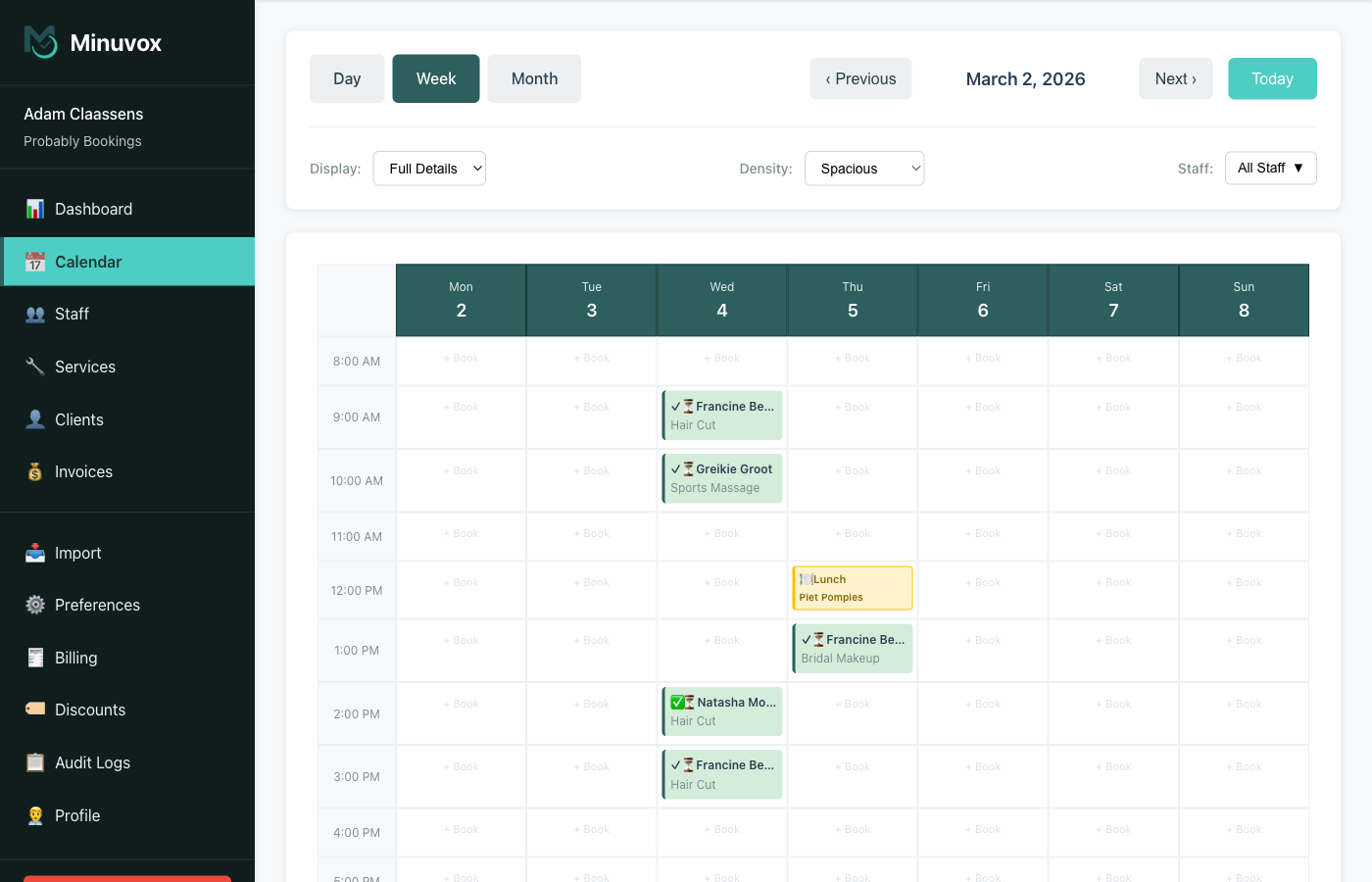
Questions to ask: Can I see my whole team’s week in one view? Can I filter to just one person? What happens if I try to book a slot that is already taken?
Client and Service Management
You are going to look up clients dozens of times a day. The software needs to make that fast.
What to look for:
- Client records with notes. At minimum: name, phone, email. Notes for allergies, preferences, or anything you need to remember between visits. Booking history so you can see what a client had done last time.
- Search and filtering. When you have 200 clients, you need to type a name and find them instantly. Filtering by status (active, inactive) is a bonus.
- Service categories with pricing. Group your services logically (Hair, Nails, Massage) with individual pricing and duration for each. The calendar should use the duration to block the right amount of time.
- Data import. If you are switching from another tool or a spreadsheet, can you import your client list and services via CSV? Retyping 300 clients is a dealbreaker for most people.
Online Booking and Reminders
These features reduce your admin workload but come with trade-offs. Not every business needs them, and not every tool offers them.
What to look for:
- Client self-booking portal. A page where clients can see your availability and book themselves. This eliminates phone tag and works while you sleep. The trade-off: you give up some control over when clients book, and you may need rules to prevent back-to-back bookings with no break.
- Automated reminders. SMS or email reminders sent automatically before the appointment. The Zoho survey found that 35% of businesses reduced no-show rates after adopting scheduling software – reminders are a major reason why.
- Recurring appointments. If a client comes every two weeks for the same service, you should be able to set that once rather than booking it manually each time.
- Waitlists. When a slot opens up due to a cancellation, a waitlist lets you offer it to clients who wanted that time. This is most valuable for businesses that regularly run at capacity.
Be honest about what you need. A solo stylist with 15 regular clients probably does not need a self-booking portal. A busy salon with four staff and 80 bookings a week probably does. Match the features to your actual workflow, not a hypothetical future one.
Minuvox supports recurring appointments but does not currently offer a client self-booking portal, automated reminders, or a waitlist. If those features are a priority for your business, check whether the tools you are evaluating include them.
Invoicing and Business Insights
Booking is half the job. Getting paid and understanding your numbers is the other half.
What to look for:
- Invoicing with a proper workflow. Draft, issue, mark as paid – not just a total at the bottom of a booking. Tax calculations, discounts, and the ability to add line items.
- Revenue tracking. A dashboard that shows total revenue, average invoice value, and how those numbers change over time. If you cannot see your revenue trend, you are guessing.
- No-show and cancellation rates. These numbers tell you how much money you are losing to empty slots. If you want to go deeper on this, we covered the full cost breakdown in The Real Cost of No-Shows.
- Staff performance. If you have multiple staff, you want to see who is busiest, who generates the most revenue, and who has the most cancellations.
- Data export. Can you get your data out? CSV export for bookings, clients, and invoices matters for accounting, tax filing, and switching tools later.
Practical Considerations
Features get the attention, but these practical factors often determine whether you actually use the software long-term.
Pricing model. Scheduling software typically falls into one of three models: - Free: no ongoing cost (Minuvox uses this model – free with no commission or subscription) - Subscription: monthly fee, usually tiered by features or staff count - Commission: a percentage of every booking or transaction (common in marketplace-style platforms)
Know the total cost at your scale. A tool that is free for one user but charges per additional staff member can get expensive quickly.
Ease of setup. How long does it take to go from signing up to booking your first appointment? If the answer is days rather than minutes, the software may be more powerful than you need – or just poorly designed.
Mobile access. You will check your schedule from your phone. Some platforms have dedicated mobile apps; others rely on responsive web design that adapts to smaller screens. Test the scheduling view on your phone before committing – a responsive layout does not guarantee the calendar is easy to use on a small screen.
Calendar integrations. Syncing with Google Calendar or Outlook means your personal and business schedules stay in one place. Not every tool offers this. Minuvox does not have calendar integrations; if that is important to you, filter for tools that do.
Payment processing. Some platforms let you collect deposits or full payment at booking time through Stripe, Square, or similar. Minuvox does not include payment processing. If collecting payments through your scheduling tool is a requirement, make sure the platform supports it before committing.
Your Evaluation Checklist
Use this table when comparing tools. The “Minuvox” column is filled in as one example – replace it with your own checks for whatever tools you are evaluating.
| Feature | Why It Matters | Minuvox |
|---|---|---|
| Core Scheduling | ||
| Day, week, month calendar views | See your schedule at different levels of detail | Yes |
| Multi-staff scheduling | Manage multiple team members in one view | Yes |
| Double-booking prevention | Avoid scheduling conflicts | Yes |
| Time-off and blockout management | Keep lunch breaks and holidays clear | Yes |
| Recurring appointments | Set regular clients once, not every time | Yes |
| Client & Service Management | ||
| Client records with notes | Remember preferences and history | Yes |
| Booking history per client | See what each client had done before | Yes |
| Service categories with pricing | Organised service menu with costs and durations | Yes |
| CSV import for clients and services | Bring your existing data without retyping | Yes |
| Online Booking & Reminders | ||
| Client self-booking portal | Clients book themselves online | No |
| Automated SMS/email reminders | Reduce no-shows with automatic notifications | No |
| Waitlist | Fill cancelled slots from a waiting list | No |
| Business Tools | ||
| Invoicing (draft to paid) | Professional invoices with tax and discounts | Yes |
| Revenue and appointment analytics | Track your numbers over time | Yes |
| No-show rate tracking | Know how much empty slots cost you | Yes |
| Staff performance reporting | See who is busiest and who generates most revenue | Yes |
| Discounts and promo codes | Run promotions with trackable codes | Yes |
| CSV data export | Get your data out for accounting or switching | Yes |
| Practical | ||
| Free or clear pricing | Know the total cost at your scale | Free |
| Quick to set up | Start booking without a multi-day onboarding | Yes |
| Works on mobile devices | Check your schedule from your phone | Web only (no app) |
| Google Calendar / Outlook sync | Keep personal and business calendars together | No |
| Payment processing | Collect deposits or payments at booking | No |
This is not a scorecard – it is a worksheet. The features that matter most depend on your business. A solo practitioner who confirms every appointment by phone may not care about automated reminders. A salon with four staff and walk-in demand may consider a self-booking portal essential.
Start With Your Biggest Problem
Before comparing tools, ask yourself one question: what is the most time-consuming or error-prone part of how you schedule today?
If it is double bookings and schedule confusion, focus on core scheduling. If it is no-shows, prioritise reminders and no-show tracking. If it is getting paid, look for invoicing and payment tools.
The best scheduling software is not the one with the longest feature list. It is the one that fixes the problem that costs you the most time or money right now.
If you want to try Minuvox, the setup guide walks you through it step by step: How to Set Up Online Booking for Your Salon.
For context on the challenges scheduling software can help with, see 5 Biggest Challenges Salon Owners Face.
About the author: Adam Claassens is the founder and developer of Minuvox. He built the platform to make professional booking tools accessible to small service businesses that cannot afford expensive monthly subscriptions.
This article was drafted with AI assistance and reviewed, fact-checked, and edited by the Minuvox team.