If your paper appointment book is a physical diary sitting on the reception desk, you are in good company. Plenty of salons, barbershops, spas, and clinics run their entire schedule from a paper grid and a pencil. It works. You know where it is, you know how it works, and you do not need a password to open it.
But paper has limits. And if you have ever missed a booking because a client called while the salon was closed, or spent ten minutes flipping pages to find when someone last visited, you have already bumped into those limits.
This article walks through the specific things a paper book cannot do for you – not to talk you into anything, but so you can decide whether those gaps matter for your business.
Paper Works – Until It Doesn’t
A paper appointment book does three things well: it shows you today’s schedule, it lets you pencil in a new booking, and it sits there reliably without needing Wi-Fi or a charged battery.
Where it starts to struggle:
Double bookings. If two staff members check the book at different times – or one person books while another is on the phone – there is no lock, no warning, and no undo. You find out about the conflict when the second client walks in.
Damage and loss. Coffee spills, pages tear, books get left in the wrong place. A year of appointment history can disappear in a moment. There is no backup of a paper diary.
No search. Need to find every appointment for a specific client over the last six months? That means flipping through 26 weeks of pages, one by one, scanning for a name.
No totals. Paper does not add up your revenue, count your bookings, or tell you which services are selling. If you want those numbers, you are maintaining a separate spreadsheet – which means doing the same data entry twice.
None of these are reasons to panic. But they are real friction points that add up over weeks and months.
Clients Do Not Only Call During Business Hours
According to Phorest’s own research, 46% of online salon bookings happen when the business is closed. That is nearly half of all booking activity happening when your paper book is sitting in an empty salon.
With digital scheduling, your staff can check the calendar and add bookings from their phone – at home, on the bus, or during a lunch break at their second job. The schedule updates in real time for everyone.
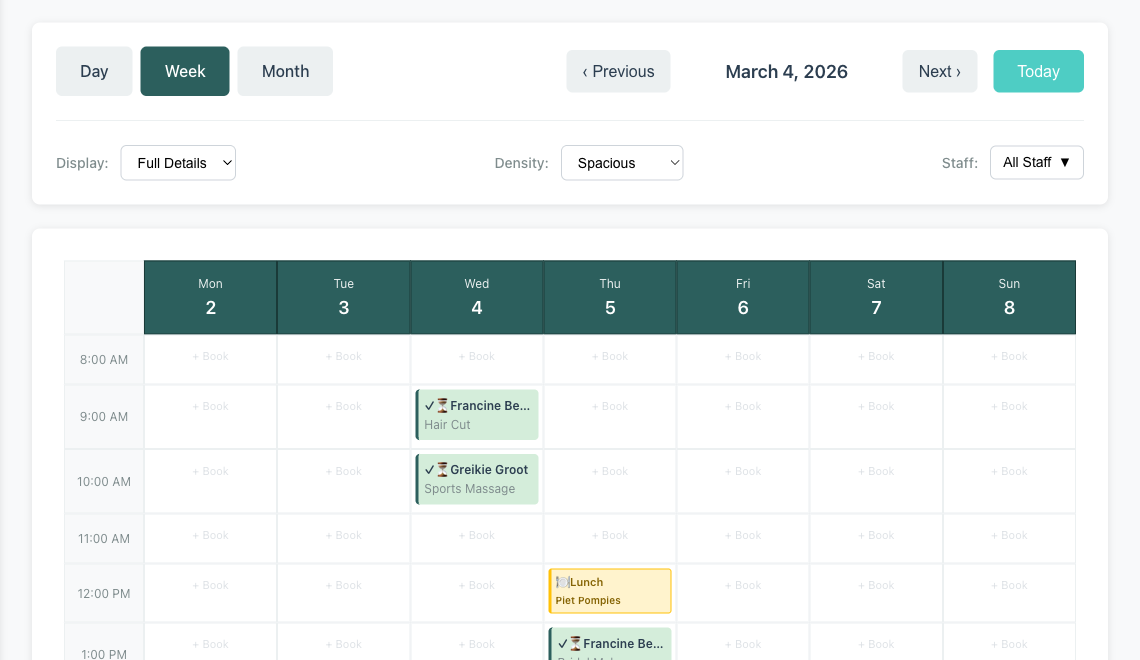
To be clear: this is not about clients booking themselves online. Minuvox, for example, is designed for staff to manage bookings – there is no public booking page where clients book their own appointments. That is a feature many salon owners ask about, but it is not available today. What digital scheduling does give you is staff access from anywhere, not just the reception desk.
Finding a Client’s History Should Not Take Five Minutes
In a paper book, appointments are stored chronologically. That makes sense for planning your day, but it is terrible for answering questions like:
- When did Sarah last come in for a colour?
- How many times has this client no-showed in the past three months?
- What is this client’s phone number?
Each of those questions requires flipping through pages manually. In a digital system, client records are searchable. You type a name, and you see their contact details, notes, booking history, and billing information in one place.
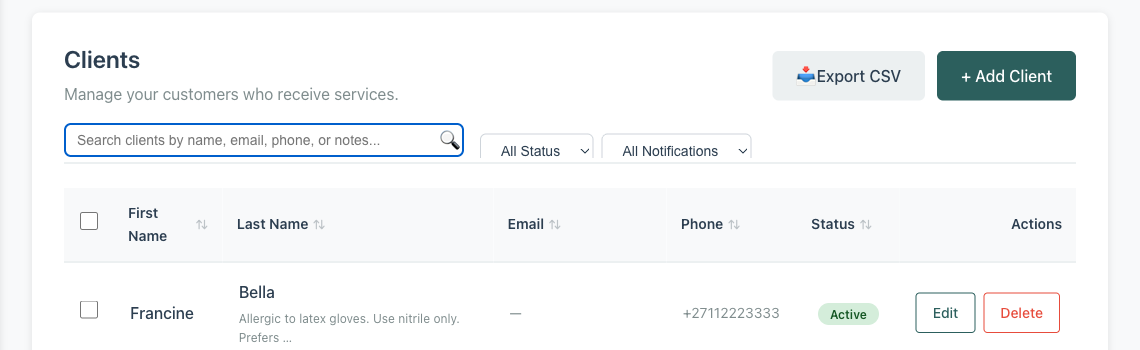
The notes field is worth calling out. Many salon owners keep mental notes about their clients – preferred stylist, allergies, that one client who always cancels on Fridays. In a paper system, those notes live in your head or on sticky notes. In a digital client record, they are written down, searchable, and visible to any staff member who needs them.
For a full walkthrough of client management, see How to Build and Manage Your Salon Client Database.
Your Revenue and Invoices Are Hiding in Your Paper Appointment Book
Paper appointment books record who is coming in and when. They do not automatically tell you:
- How much revenue you brought in this month
- What your average invoice total is
- Which services your clients book the most
- Which staff member is generating the most revenue
Getting those numbers from paper means sitting down with a calculator or a spreadsheet and entering every line item manually. Most business owners either do this work on weekends (when they should be resting) or they skip it entirely and run their business on gut feeling.
Digital scheduling with built-in analytics does this work for you. Every booking feeds into a dashboard that shows revenue totals, appointment counts, popular services, and staff performance – updated in real time, not at the end of the month.
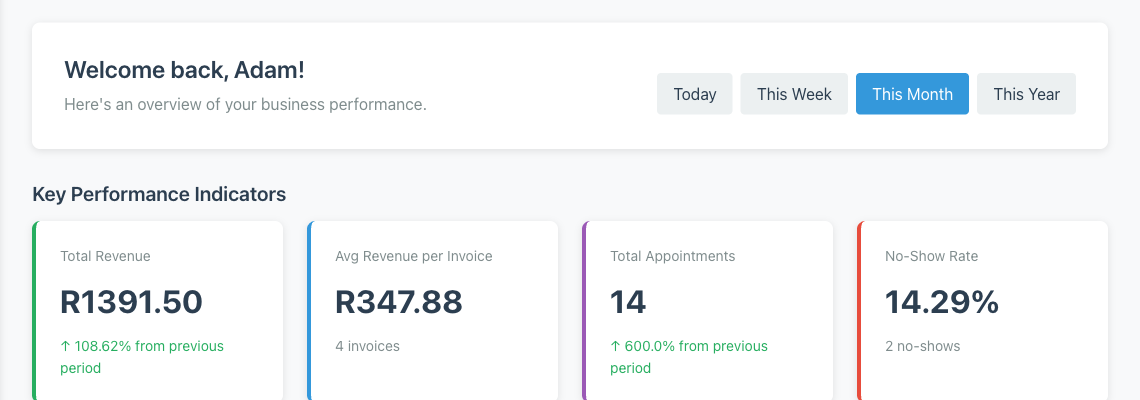
When you can see your numbers at a glance, you make better decisions. You notice that Tuesday afternoons are consistently empty. You see that one service category is growing while another is flat. You spot that your revenue dipped last month and can investigate why – instead of discovering it when rent is due.
Invoicing is the other half of the problem. Many salon owners write invoices by hand, use a separate template, or skip formal invoicing entirely. That means re-entering information that already exists in your schedule: the client name, the services, the prices, the date. Digital systems generate invoices directly from completed bookings – the details are already there, and each invoice feeds back into your revenue numbers automatically.
For more on reading your dashboard, see How to Read Your Salon Dashboard and Spot Business Trends. For a walkthrough of the invoicing process, see How to Create Professional Invoices for a Service Business.
No-Shows Are Costing You More Than You Think
Every salon owner knows the frustration of a client who does not show up. But do you know your actual no-show rate? With a paper book, you might remember the worst offenders, but you have no systematic way to measure how often it happens or whether it is getting worse.
Digital scheduling tracks this automatically. In Minuvox, every booking has a status – scheduled, confirmed, arrived, in progress, completed, cancelled, or no-show. When you mark a booking as a no-show, that data feeds into your dashboard. Over time, you see your no-show rate as a percentage, and you can spot patterns: is it worse on certain days? With certain clients?
Knowing the number is the first step toward reducing it. Once you can identify repeat offenders, you can decide what to do – require deposits, call to confirm the day before, or stop accepting bookings from clients who consistently waste your time.
One thing to be straightforward about: Minuvox tracks your no-show rate but does not currently send automated appointment reminders. Automated reminders are one of the most effective tools for reducing no-shows, and many scheduling platforms offer them. That is a feature Minuvox does not have yet. If automated reminders are your top priority, you may need a tool that offers them. But if you want to understand your no-show problem before you try to solve it, tracking is where you start.
Making the Switch
The most common fear about moving from paper to digital is losing data. What about all the clients you have built up over the years? What about your current schedule?
Here is the practical answer: you do not need to migrate everything on day one.
Start with your active clients. If you have a phone contact list or a client book, you can import clients in bulk using a CSV file (a simple spreadsheet format). Export your contacts, add a few columns (first name, last name, phone, email if you have it), and upload. Minuvox accepts CSV imports for clients, services, categories, and staff – so you can get your entire setup loaded in one sitting.
Add your services. List the services you offer with their prices and durations. If you already have a printed menu, the information is all there – you just need to enter it once.
Start booking digitally from a set date. Pick a Monday. From that day forward, every new booking goes into the digital system. Your paper book becomes a reference for anything before that date. After a few weeks, you will stop needing to check it.
One piece of advice if you are making this switch: do not try to re-enter years of historical appointments. Your paper book is an archive. Your digital system is for today and forward.
The other common concern is cost. Most booking software runs $30 to $200 per month, and for a small salon watching every rand or dollar, that is a real barrier. Minuvox is free – no subscription, no commission, no feature restrictions, no trial period (see the full feature list). We fund the platform through advertising, not user fees. The switch costs time, not money: an afternoon to set things up, and after that the daily workflow is faster than paper because the system does the searching, adding, and calculating for you.
For the full setup walkthrough, see How to Set Up Online Booking for Your Salon.
Start Where You Are
You do not need to throw away your paper book tomorrow. If the idea of going fully digital feels like too much, here is a low-risk way to try it:
- Set up a free Minuvox account and add your services
- Import your active clients (or add them as they come in)
- Run both systems in parallel for one week – book on paper and in Minuvox
- At the end of the week, check which system you actually looked at more
If you try this, you will likely find that after a few days the paper book becomes redundant. The calendar is on your phone, the client search is instant, and the revenue total updates itself.
If you are ready to try it, start with our step-by-step guide: How to Set Up Online Booking for Your Salon. The full setup takes about 20 to 30 minutes.
About the author: Adam Claassens is the founder and developer of Minuvox. He built the platform to make professional booking tools accessible to small service businesses that cannot afford expensive monthly subscriptions.
This article was drafted with AI assistance and reviewed, fact-checked, and edited by the Minuvox team.