Running a salon means doing two jobs at once. There is the work itself – cutting, colouring, styling, serving clients – and then there is the business behind it: scheduling, invoicing, tracking who showed up and who did not, managing staff, and trying to figure out whether you actually made money this month.
Most salon owners got into the industry because they are good at the first job. The second one is where things get difficult.
These five challenges come up in industry surveys and research reports over and over again. Each one is backed by real data, and for each one, there are concrete ways that scheduling and management software can help – though not always in the ways marketing brochures suggest.
1. No-Shows and Last-Minute Cancellations
An empty chair costs money even when no service is delivered. You are still paying rent, utilities, and staff for that time slot. And when a client cancels with less than a day’s notice, filling that gap is rarely possible.
According to a 2025 survey by Fresha covering more than 200 UK beauty and wellness businesses, hair and beauty salons lose an average of 7% of monthly revenue to cancellations and no-shows. Sixty-two percent of clients who cancel do so with less than 24 hours’ notice, and only 8% of businesses reported never experiencing cancellations at all.
Seven percent of revenue may not sound dramatic, but on a salon turning over R50,000 a month, that is R3,500 walking out the door – every month, without fail.
How software helps: The first step in reducing no-shows is knowing your actual rate. Paper appointment books have no way to track this systematically. Scheduling software with booking statuses (scheduled, confirmed, cancelled, no-show) lets you see your no-show rate as a percentage over time, spot patterns (worse on Mondays? with specific clients?), and decide what to do – whether that is requiring deposits, calling to confirm, or declining bookings from repeat offenders.
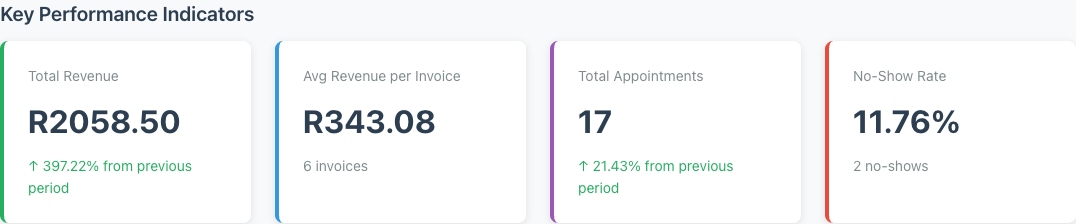
Minuvox, for example, tracks your no-show rate on the dashboard as a live KPI. Every booking moves through statuses, and no-shows feed directly into your analytics.
One thing to be straightforward about: the most effective tool for reducing no-shows is automated appointment reminders – a text or email sent the day before the appointment. Not all scheduling software includes this, and Minuvox does not currently offer automated reminders. If reminders are your top priority, check whether the tool you are evaluating supports them. But tracking the problem is the necessary first step, regardless of the tool you use.
2. Keeping Clients Coming Back
Getting a new client through the door is expensive. Keeping them coming back is where the real revenue lives. But many salons lose clients between the first and second visit without realising it.
Boulevard’s 2023 Client Retention Report, based on 11 million appointments across more than 30,000 service providers, found that the average salon retains just 45% of first-time visitors for a second appointment. Top-performing salons retain 70%.
That 25-point gap is not about talent or location. It is about whether you have a system for noticing when someone does not come back.
How software helps: When your clients are in a searchable database with notes, contact details, and booking history, you can see at a glance who has not visited in three months. You know what they last booked. You know what their preferences are (if you have written them in the notes). That information is the raw material for a follow-up – a phone call, a text, an email – that brings them back.
Without digital records, “who has not been in for a while?” is a question you answer from memory, which means you only remember the clients you were already closest to.
To be clear: software gives you the information to act on. The follow-up itself is still your job. Minuvox does not send automated follow-up messages or run a loyalty programme. What it does give you is a client list you can search, filter, and review – so the data is there when you are ready to use it.
For a walkthrough of how to manage your client database, see How to Build and Manage Your Salon Client Database.
3. Not Knowing Your Numbers
How much revenue did your salon bring in last month? Which services made the most money? Which staff member generated the most bookings? Is your no-show rate getting worse or better?
If you cannot answer those questions without sitting down with a calculator or a spreadsheet, you are running your business on gut feeling. And that is a problem, because the same Fresha survey cited above found that 51% of salon owners say cancellations make it difficult to pay business expenses. When you do not track revenue in real time, a bad month becomes obvious only when rent is due.
How software helps: Scheduling software with built-in analytics does the maths for you. Every completed booking feeds into a dashboard that shows total revenue, average invoice value, popular services, and staff performance. You do not need to enter numbers into a spreadsheet at the end of the month – the data is there because the bookings are already in the system.
Invoicing is the other half of this. When you generate invoices directly from completed bookings, every service, price, and client detail is already filled in. That invoice total feeds back into your revenue numbers automatically, closing the loop between work done and money earned.
For more on reading your business data, see How to Read Your Salon Dashboard and Spot Business Trends. For the invoicing workflow, see How to Create Professional Invoices for a Service Business.
4. Scheduling Across Multiple Staff
Solo stylists have it easier here: one calendar, one person, no conflicts. But the moment a salon grows to two, three, or five staff members, scheduling becomes a coordination problem.
Who is working Tuesday afternoon? Can Sarah take a colour appointment at 2pm, or is she already booked? Did anyone tell the new hire that she is assigned to blowouts but not chemical treatments?
Staff mobility makes this harder. The Bureau of Labor Statistics projects approximately 84,200 annual openings for barbers, hairstylists, and cosmetologists through 2034, driven largely by people leaving and entering the field. When team members change frequently, your scheduling system needs to absorb those changes without missing a beat.
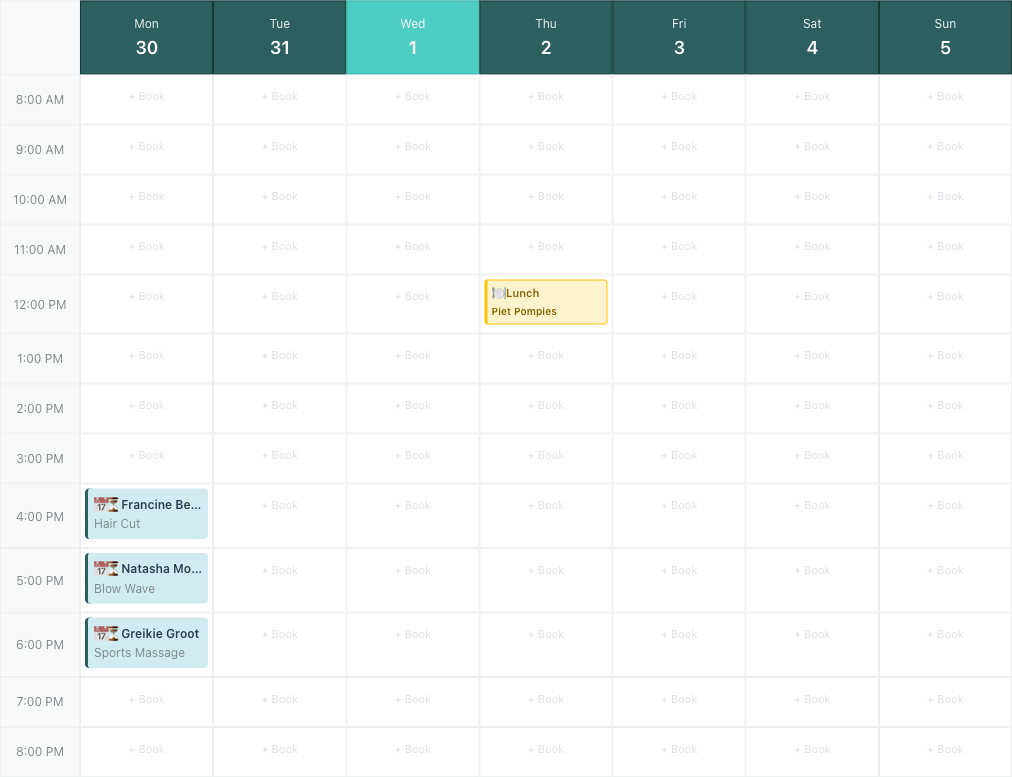
How software helps: A shared digital calendar that all staff can see – filtered by person, by day, or by week – eliminates the “who booked what?” confusion. Service-to-staff assignments mean you can specify that a particular stylist handles colour but not cuts, and the system reflects that when bookings are made. When someone joins or leaves, updating the calendar takes minutes, not days of reworked paper schedules.
For a full scheduling walkthrough, see Staff Scheduling for Small Service Businesses.
5. Time Lost to Admin
Salon owners did not go into the beauty industry to do data entry. But between writing invoices by hand, keeping client details in a contact book, tracking revenue in a spreadsheet, and managing a paper appointment diary, admin work eats hours every week.
The Fresha survey found that 55% of salon owners work longer hours because of the admin burden created by cancellations and day-to-day business management. That is time spent on tasks that keep the business running but do not directly serve clients – and for many owners, it comes out of evenings and weekends.
How software helps: The common thread across all five challenges in this article is that software consolidates work that would otherwise happen in three or four separate places.
- Invoicing: generated from completed bookings, not retyped from scratch
- Client records: searchable and editable, not scattered across a phone contact list and a paper book
- Revenue tracking: automatic from booking and invoice data, not manually entered into a spreadsheet at month end
- Scheduling: one shared calendar, not a paper grid that only one person can read at a time
None of this eliminates admin entirely. You still need to review invoices, update client notes, and check your calendar. But the repetitive parts – the retyping, the searching, the manual totalling – go away. If you are spending an hour a week on those tasks, getting that hour back is not a luxury. It is time you can spend with clients or away from work.
For practical advice on moving from paper to digital, see Still Using a Paper Appointment Book? What You’re Missing.
Where to Start
You do not need to solve all five at once. Start with the challenge that is costing you the most:
- If no-shows are your biggest problem, start by tracking your rate. You cannot fix what you do not measure.
- If you are losing clients after the first visit, get your client records into a searchable system so you can see who has gone quiet.
- If you do not know your revenue numbers, try running a dashboard alongside your current system for a month and see what the data tells you.
The right scheduling software handles multiple challenges with a single tool. Minuvox covers scheduling, client management, invoicing, and analytics – and it is free, with no subscription, no commission, and no feature restrictions.
If you want to try it, the full setup takes about 20 to 30 minutes. Start here: How to Set Up Online Booking for Your Salon.
About the author: Adam Claassens is the founder and developer of Minuvox. He built the platform to make professional booking tools accessible to small service businesses that cannot afford expensive monthly subscriptions.
This article was drafted with AI assistance and reviewed, fact-checked, and edited by the Minuvox team.